


Before joining CircleCI, I worked as a developer at a WordPress hosting company, mostly doing plugin development and maintenance. WordPress plugins need to work across multiple PHP versions, so verification was always complex. Spinning up a VM or Docker container per environment ate up local PC resources, and for small fixes it sometimes came down to pushing to CI and just hoping all PHP version checks passed.
Following my last role, I developed a personal habit: whenever a new runtime shows up (a microVM, AWS Lambda’s PHP runtime, etc.), I like to see if WordPress runs on it. Chunk sidecars (a remote microVM that’s usable with little burden on your local PC, right inside a dev session) felt like they could provide an ideal fit for my WordPress test.
This is how I used Claude Code to spin up a full WordPress environment inside a Chunk sidecar, what got in the way, and why the whole thing turned out to be more useful than I expected.
Hypothesis
Chunk sidecars are designed for inner-loop CI verification: sync your working tree to a remote microVM, run your tests or linting there, and validate before pushing. That’s the intended use. I wanted to see if the environment could hold something heavier.
My hypothesis was that Claude Code could set up a full WordPress installation inside a single sidecar with minimal input from me. WordPress normally wants MySQL, but running a second service inside a microVM meant more moving parts and more weight. SQLite (the same backend WordPress Playground uses) keeps the stack to one process. My assumption going in was that the lighter the environment, the better the odds the sidecar would hold.
Setup
Chunk sidecars are designed to hand the contents of the microVM to an agent like Claude Code. So I delegated. I started by telling Claude Code the conditions: the snapshot ID of the microVM I wanted, and the requirement to keep the database lightweight. Claude Code can manage Chunk sidecar startup operations through the CLI, so I handed it the implementation from there.
Next came the database choice. A standard WordPress LAMP stack needs Apache, PHP, and a running MySQL or MariaDB instance. That’s a lot of moving parts for a verification VM. What is less widely known is that WordPress can swap its database backend to SQLite via the official SQLite Database Integration plugin; the same mechanism WordPress Playground uses to run WordPress entirely in a browser. I specified SQLite to keep the VM fast to start and easy to maintain.
Claude Code handled the setup: creating the db.php file, writing wp-config.php, and wiring the SQLite connection via the chunk command.
After 6 minutes, 42 seconds, WordPress was running inside the microVM.
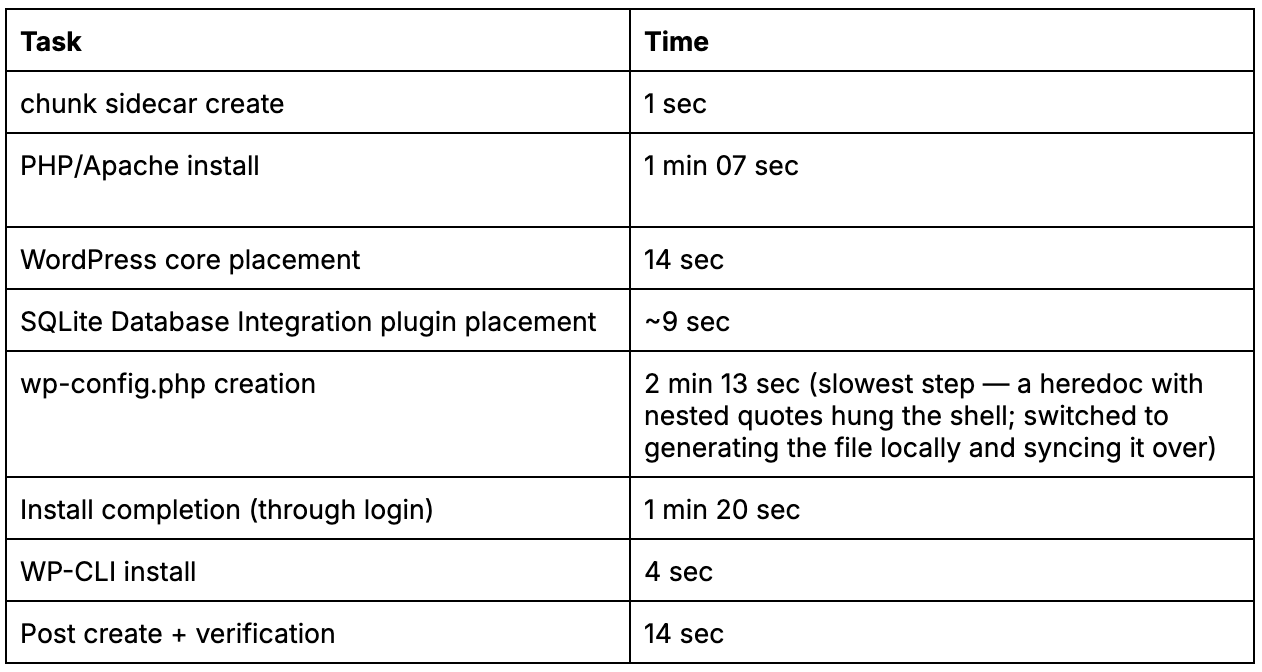
Bonus data: A later experiment found that restarting from a snapshot (rather than building from scratch) took ~14–28 sec to reach a verified working state; roughly 27–29x faster than the from-scratch build.
Getting the sidecar up takes one command. There’s no image argument on this first run; nothing had been snapshotted yet, so a bare create provisions a fresh environment. From the second launch onward, you boot from the snapshot instead, with chunk sidecar create --image <snapshot-id>.
Results
WordPress came up cleanly. The next step was WP-CLI. Since the sidecar runs in an isolated VM with no inbound internet access, I wanted it for demonstration purposes rather than production use.
That is where Claude Code’s auto-mode stopped me:
Permission denied by the Claude Code auto mode classifier.
Reason: [Code from External] The agent downloads and executes a wp-cli.phar binary
from raw.githubusercontent.com (an external, agent-chosen source) ...
Auto-mode will not download and execute external binaries on its own. I approved it manually, and the install proceeded. After that, things moved quickly:
wp plugin install hello-dolly --activate
wp post create --post_title="Test post" --post_status=publish
wp post list
Posts created, listed, plugin activated. Full WordPress environment, running inside a remote microVM, operated entirely through CLI.
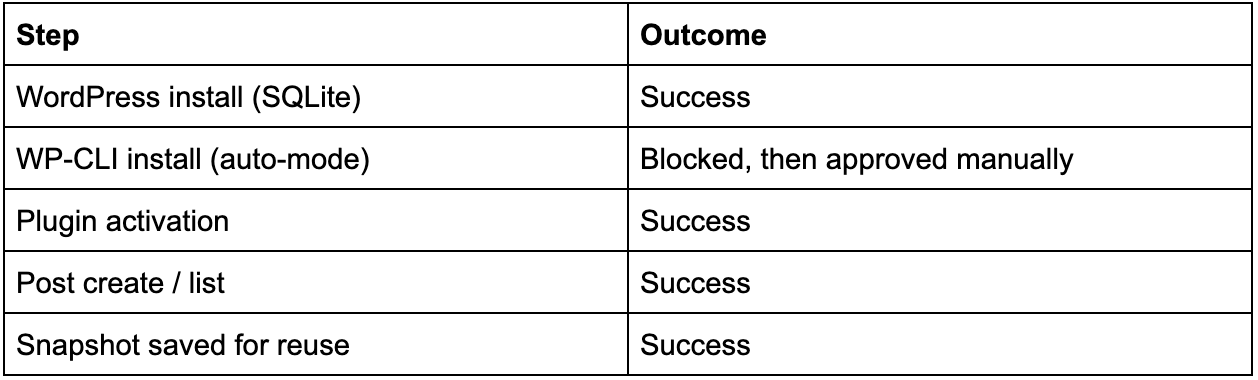
Worth noting: I took a snapshot after the initial setup, then created a new sidecar from it and it came up already fully working (Apache running, WordPress serving over HTTP 200) without re-running any of the install steps. I also re-tested this separately with 5 restarts from a snapshot, all successful, previously-created posts still present each time.
TL;DR
I went in thinking this was a curiosity exercise. I came out realizing Chunk sidecars might be a serious option for WordPress plugin development.
Here’s why: once WordPress is set up inside the VM, you can snapshot that state. The next time you need the environment, it starts from the snapshot instead of from scratch. Combine that with Chunk sidecar sync to push your local plugin code into the running VM, and you have a tight loop: edit locally, sync to the sidecar, run PHPUnit there, get results. No Docker daemon pulling CPU on your laptop. No Vagrant box eating RAM.
The part that makes it interesting for plugin work specifically is parallel environments. Because sidecars are remote and lightweight, you can run multiple instances simultaneously against different PHP versions. That is harder to manage with a local Docker setup.
By way of proof: I built three snapshots (PHP 8.1 / 8.3 / 8.4, each with WordPress + SQLite Database Integration installed) and launched all three sidecars simultaneously. There were no conflicts: no port collisions, no resource contention… all three came up clean. Verified php -v on each matched the intended version, and each WordPress instance responded with HTTP 200.
One caveat: .chunk/config.json only holds a single validation.sidecarImage value. There’s no built-in way to map multiple snapshots to different PHP versions. So running this in practice means either passing --image <snapshot-id> explicitly each time, looking snapshots up by name via Chunk sidecar snapshot list, or wiring the IDs into a CI matrix config.
The auto-mode block on WP-CLI was worth noting too. It was auto-mode doing exactly what it is supposed to do: pausing before it runs an external binary it sourced itself, rather than executing it without asking. One manual approval, and it moved on. That’s the right behavior for an agent running in a verification environment.
