


I found this problem by accident. I was reviewing our onboarding docs, which we try to do fairly regularly because the processes change.
In the past, that kind of review meant walking through the process set out in the existing docs myself, and taking notes and screenshots for each step in order to find gaps and outdated content. This job has expanded over recent months. The paths into a product have multiplied: People, or agents, might be doing everything from the terminal. You might use a skill, a plugin with your agent, or ask your agent to use the CLI, APIs, or MCP. There are now many ways to get set up, and I had to understand each to make sure we have them documented correctly.
So instead of just screenshotting the app, I planned to draw up journeys in a Figma file for each of the different ways you can get a project set up, with screenshots or a note of the command and outcome at every step.
Partway through, something odd happened. I had previously installed the CircleCI plugin while working on docs about how to use it. Since this is how Claude is designed to work (pick up cues from our interactions and decide how to best approach the task), my Claude session found it, decided it was relevant, and used it without my asking. It then sent me to a URL that doesn’t exist. Meanwhile, the CLI running in the same session had shown me a list of my orgs and asked me to pick one.
Three things didn’t add up:
I’m used to Claude knowing which org I’m in, so being asked for one felt off.
The plugin sent me to a browser, outside the loop of what Claude and I were working on.
The CLI could already do what the plugin was asking me to do elsewhere. It lists your orgs, and it can create one, so there was no reason to open a browser and click through a bunch of buttons.
Put together, these pointed to one conclusion: Claude was following stale instructions. The skill and the tool had drifted apart, and Claude followed the skill.
What I can’t tell you is how the skill got that way. It may have been written by an agent that made up the URL, or a review may have been missed, or the URL may once have existed and since been removed. Whichever it was, the result for me was the same.
Claude gave no sign that anything was wrong. Agents don’t signal uncertainty when they follow stale skills. It didn’t say “I found a skill, it might be out of date, here’s what it says.” It just followed the skill. The skill had become invisible infrastructure: something I didn’t know was running until it sent me somewhere wrong. With default settings, even when skills are packaged as plugins with versioned releases, an agent or human user won’t automatically know their skills are outdated, unless the individual user has previously opted into that configuration.
Today, I’ll be sharing how I worked through this challenge.
Hypothesis
I went in with a simple hypothesis: a Claude session with a relevant skill installed would perform at least as well as the underlying tool. Skills are supposed to give agents richer context than a --help flag alone, so I expected the plugin path to match the CLI at minimum, and probably improve on it.
That hypothesis was wrong. The skill-assisted session did worse than the CLI, and it did so without telling me. Several assumptions sat underneath my hypothesis, and each one fell apart:
I assumed a skill would stay in step with its tool. I didn’t realize a skill could drift from the underlying tooling in such an extreme way, or that it could happen so quickly.
I assumed I’d know when a skill was running. I’d forgotten I had the plugin installed at all, since I’d added it for a different line of work. In a natural-language chat, you don’t know what the agent is doing unless you check.
I assumed the agent would choose sensibly between sources. The skill took precedence over the CLI, and nothing told me it had.
I assumed there were only a few ways to get set up. There were far more paths than I’d expected, and they behaved very differently.
Being wrong meant changing how I tested. I’d assumed the plugin’s instructions would stay in step with the CLI, so I’d treated the two as interchangeable. They aren’t. Each way of getting set up can drift on its own, so each one needs its own test.
Setup
It became clear that I would need to check all of the different ways to set up my project. I began with just the CLI in my terminal. I asked Claude to run through the steps using only the CLI, the underlying tooling, being explicit about which parts of the product to use. I asked Claude to enable the CLI MCP and get set up. All while noting the steps in my Figma file.
The conditions for the test were simple: I already had a CircleCI account, I was admin of an org, and I had a generic GitHub project with no CircleCI config. The task was just to set up that project, with my orgs already in place. It shouldn’t have been difficult.
I tested three (of many) paths for the same task:
CLI directly in the terminal
CLI in a Claude Code session, no plugin installed
Claude Code session with the public CircleCI plugin installed (https://github.com/CircleCI-Public/skills)
In the third session, the plugin’s onboarding skill loaded without my explicitly invoking it. Claude found it, treated it as authoritative, and followed it.
I’d expected the three paths to feel broadly similar. It surprised me how different they were. To get through the process with the skill, I had to report the issue to the engineering team, ask for the problem to be fixed, and then go back and check that it was working.
It didn’t stop me from doing the work. The how-to guide I was updating doesn’t explicitly say “install the plugin, tell your agent to do this,” so I could carry on. But I had to pause, report to the team that something was off, and return to it later.
This would have come up eventually, and it might well have been a customer who hit it first. Writing or updating guides is a common way to uncover bugs, and catching them before customers do is one of the ways the docs team can bring the voice of the customer back to engineering teams directly.
Results
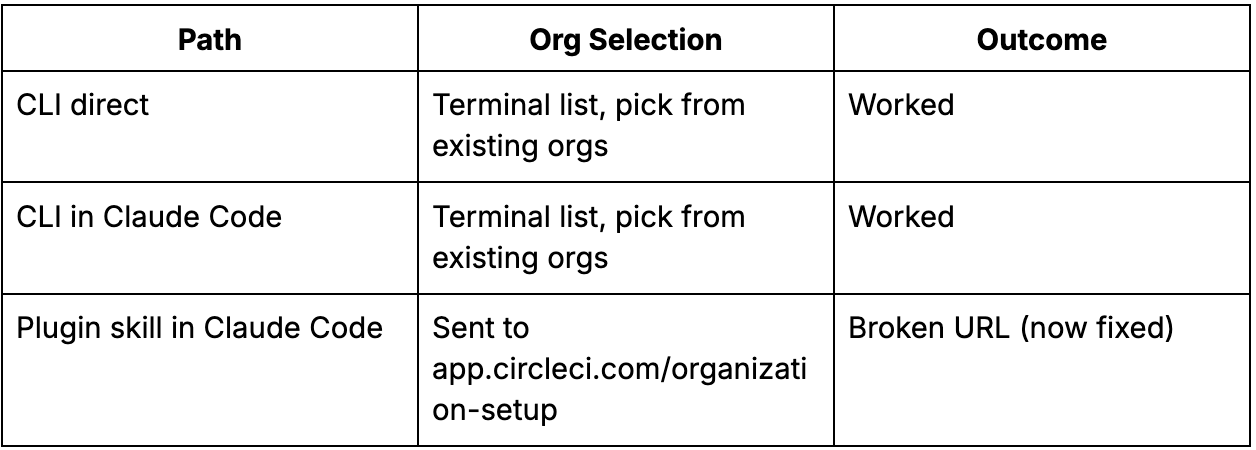
The results clearly showed that the skill and the CLI had diverged. The CLI had been updated to handle org selection in the terminal. The skill still pointed to a browser flow with a URL that didn’t exist. Claude had no way to know which was fresher. It used what it found.
As mentioned earlier, Claude also asked me for an org slug (something the CLI can already see when I’m authenticated) and wanted me to create a new org in the app, at a URL I didn’t recognize. I’m quite familiar with our URL patterns, and from working on the CLI docs, I know the CLI and API can create an org. There should have been no clunky opening of a browser and clicking of buttons.
Note: The agentic experience team has since fixed the skill. Instead of sending users to a broken URL in a browser, the agent now prompts them to pick an org in the session, so no URL is needed.
What this says about our docs
Many of our user guides were written from the viewpoint of clicking buttons in the web app. Today, we need to document more use cases for using our tools from a terminal. The fact is that every guide needs reviewing from the point of view of an agent doing the work, with a human in the loop or without one.
That’s a different level of review. You can get agents to write your docs for you, but you still need to check that they’re correct for the various ways your audiences work. Today, there are a lot more steps to cover, and getting through the work quickly and accurately is the challenge.
What happened to my Figma file
To record each journey, I’d been building a Figma file with screenshots of every step, or a small box with the command and outcome at each step from A to B. By the time I finished and found this problem, the “Using the Skill” section of the Figma was out of date the same day I created it. The artifact is still useful as a reference but by no means a static source of truth to build on. It’s a snapshot in time that will need to be constantly reviewed, just like the doc itself. A scratchpad.
It was a useful exercise, but the artifact that ultimately matters is the documentation, and even that may be a losing battle because the skills have already changed. I probably wouldn’t do it that way again.
Ideally, we’d move to automated docs generation from the code, with an added human review to confirm the reality of the experience. The challenge will be extracting what parts of this process we can optimize and automate for speed of delivery to keep things consistently up to date. However this rolls out, the most reliable way to ensure that docs are correct will always be returning to the product as it is, on the day of the update.
Keeping docs from going stale
Rather than constantly rebuilding Figma journeys, I’d now lean on a few other things:
Community feedback, which now includes agents. An agent could report, via an integration with our chatbot, something like “when I was answering this customer question, I couldn’t give them an accurate answer because...”
An agentic review on a rolling basis, so docs don’t go stale between manual passes.
Watching for changes in the relevant codebase and automating change requests in the corresponding docs. For example, the code change could flag an integration to create a Linear ticket, the agent would read the ticket scope and draft the change, and finally a human would review the change against real product use.
TL;DR
Every public skill, MCP description, or structured doc you’ve published is now part of your agent surface, and agents will act on it as written. Skills are instructions for agents, so they need an owner who updates them whenever the tool changes, just like product docs.
The practical check: when did you last run your own onboarding flow with a plugin installed? The people maintaining the CLI aren’t always the people maintaining the skill, so the two can disagree without anyone noticing.
The app’s UI text, the skill, and the docs all carry the same instructions now, and every copy has to match; both each other and how the product actually works.
