


Software companies have spent decades designing products around the needs of the people who use them. We started by focusing on user experience (UX): making software understandable, intuitive, and effective for end users. Then, as software became something developers increasingly had to integrate with, extend, and build on, developers became an important user group in their own right. Developer experience (DX) grew out of the need to design for them specifically, with APIs, documentation, SDKs, CLIs, and workflows built around how developers work.
Now we’re building for a different kind of user: AI agents. Increasingly, agents are taking action on behalf of users and developers. They’re reading documentation, inspecting code, calling APIs and CLIs, and using MCP tools to interact directly with products. And just as good UX and DX require designing around the needs of their users, products need to account for how agents find information, choose tools, make decisions, and take action.
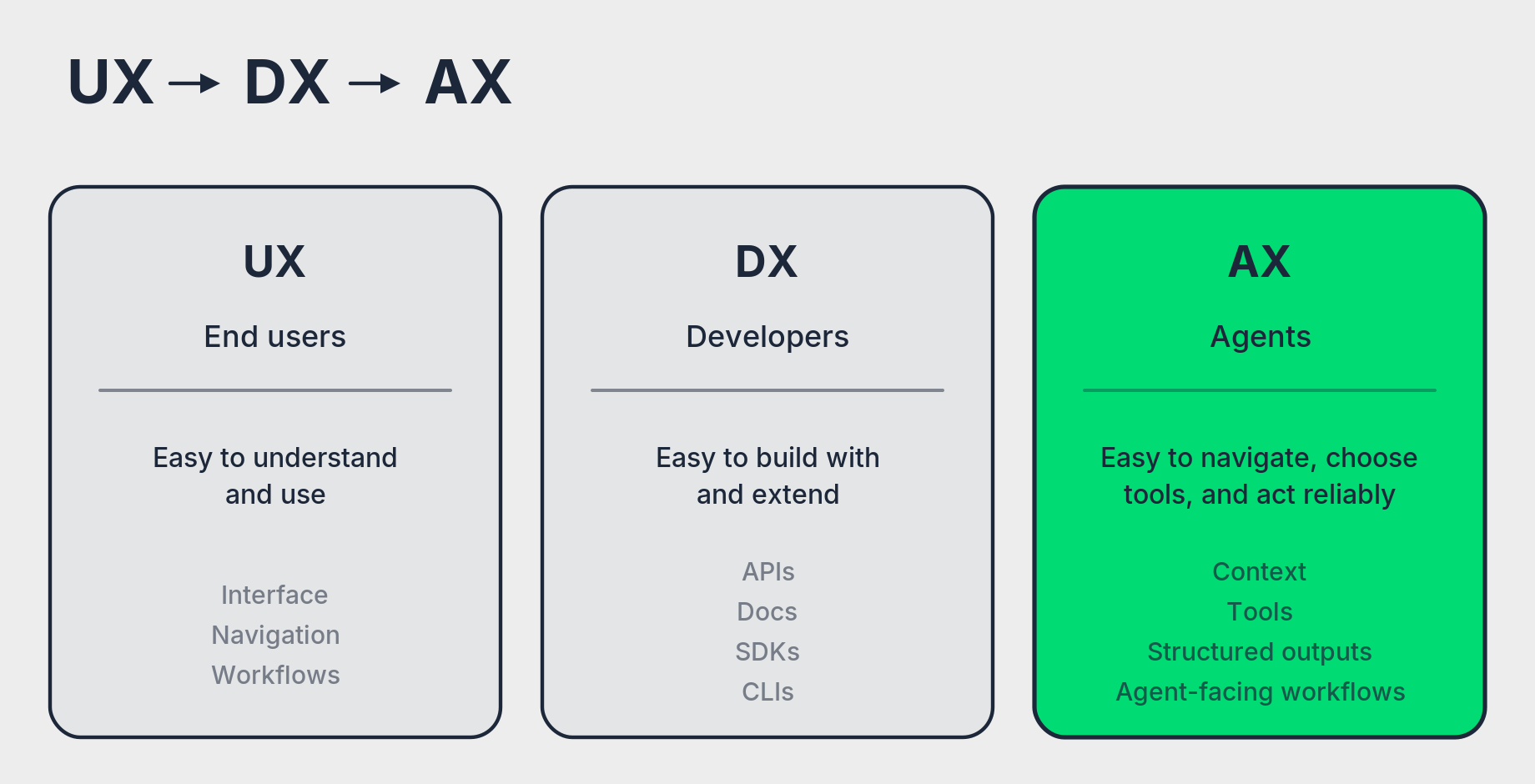
The industry has started calling this agent experience (AX). As more work moves through agents, their ability to understand and operate a product becomes part of the product experience itself. A platform can have excellent UX and DX and still be difficult for an agent to use reliably. At CircleCI, we’ve made solving that problem a core product goal: making CircleCI work just as well for agents as it does for the developers they support.
In this issue we’re sharing what we’ve learned redesigning CircleCI for agents. We’ll start with the product problem that pushed us into AX, then walk through five findings from our testing that changed how we think about context, tools, evaluation, and the way agents interact with a product.
We started with broken builds
The need to design for agents is already showing up in how customers use CircleCI. In our 2026 software delivery data, average daily workflow volume increased 59% year over year, the largest increase we’ve measured. More agent-generated code means more builds, tests, and opportunities for failures to interrupt the development loop.
Broken builds were the highest-value place to start. If agents can produce code quickly, they also need an efficient way to recover when validation fails. Our first approach followed what Netlify CEO Mathias Biilmann describes as the closed model of agent experience. The original version of Chunk was a hosted agent that could diagnose a failing build, propose a fix, and open a pull request.
In production, Chunk turned CI green on around half of its attempts, but developers chose to merge less than 25% of its fixes. The takeaway was clear: engineers wanted more control over the fixing process. So we moved toward the open model, giving their existing agents direct access to CircleCI data and tools, so the developer could stay informed and in control of the recovery process.
Early benchmark testing showed how sensitive agent performance was to the environment around the model. In a 100-sample benchmark of CI repair tasks, better log preprocessing increased the share of proposed fixes that closely matched the known solution from about 25% to 53%. The size of the improvement made one thing clear: context, tools, evaluation, and workflow design could materially change how well the agent performed. We started testing those variables more deliberately, and five findings stood out.
1. Agents need finely tuned context
Our first instinct was to give the agent as much information as possible. The results moved in the opposite direction.
A raw build log can contain thousands of lines covering environment setup, dependency installation, test output, retries, warnings, and other execution details. Most of that information has little bearing on the failure the agent is trying to diagnose.
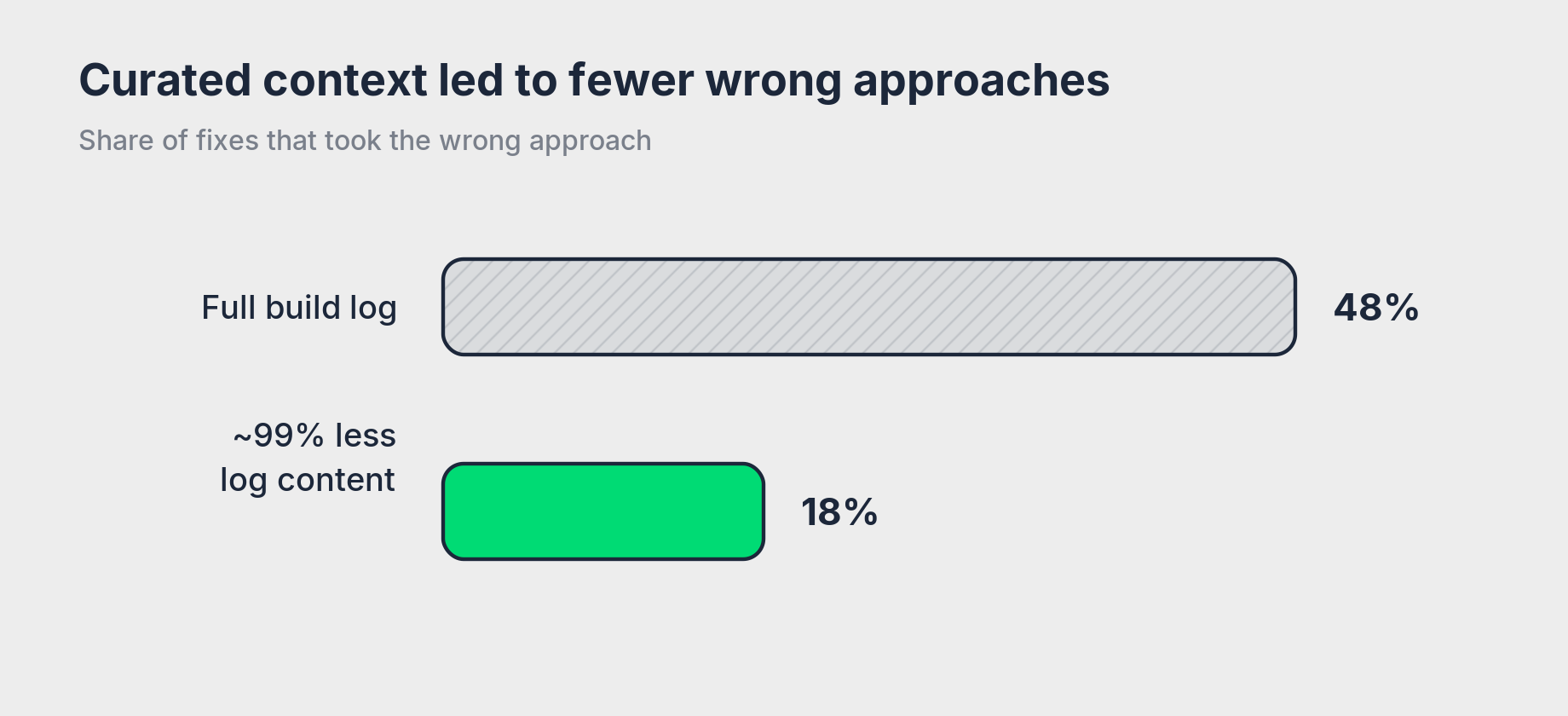
When we removed about 99% of the log content, the rate of fixes that took the wrong approach fell from 48% to 18%.
The experiment also showed that context placement mattered. Adding git context as a file did not improve performance, but putting the same information directly into the message produced our strongest run at that point. The share of fixes that followed project conventions increased from 59% to 90%.
For teams building agent workflows, context is worth treating as an input you design and evaluate. Test what information you provide, how much you provide, and where the agent encounters it.
2. Keep the tool set focused
Better context improved performance, so we tested whether giving the agent more capabilities would help further. We added skills, forced reasoning steps, and a much larger set of MCP tools.
More capability did not consistently produce better results. Added skills used about 24% more tokens without improving quality, and forced workflow steps reduced fix rates in our tests. In our largest MCP test, the server exposed 138 tools for the agent to choose from. The agent consistently relied on just 10 of them, less than 10% of the available tool set.
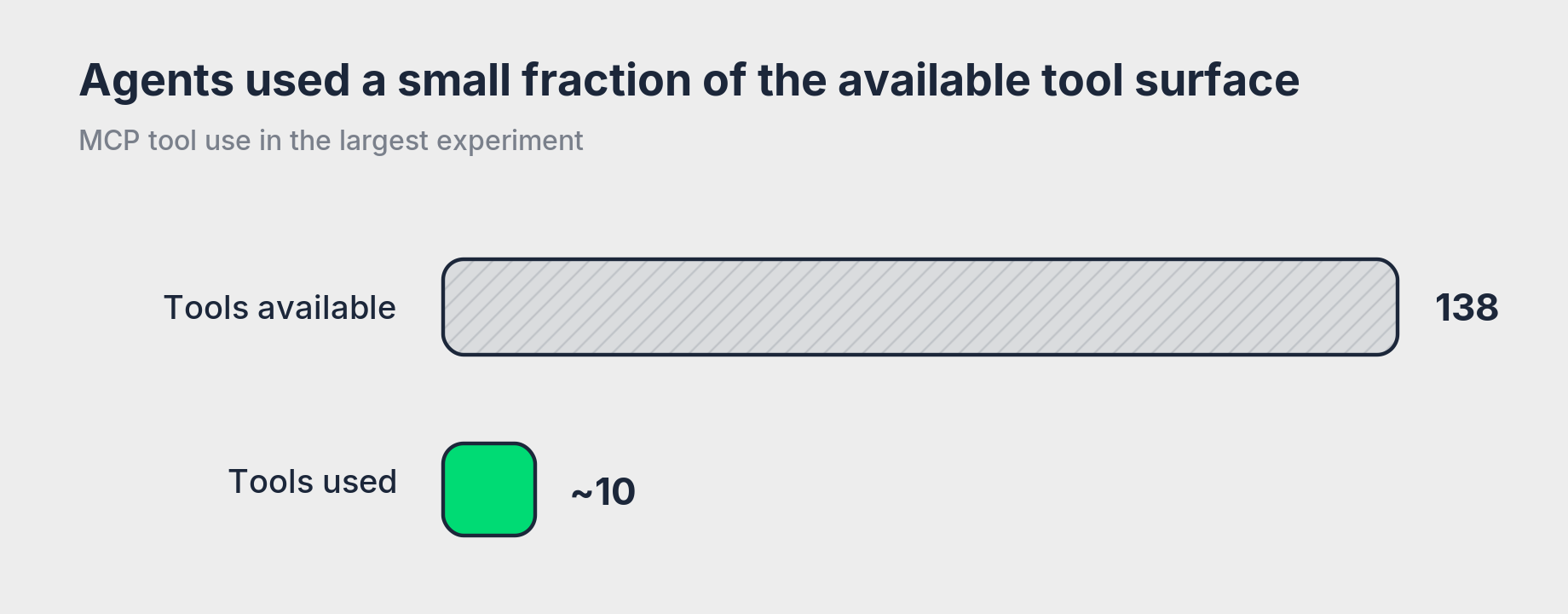
A developer who knows a product can navigate a broad API surface and choose the right endpoint. An agent has to select among MCP tools based on their names, descriptions, and the context available to it. Exposing every underlying API capability as a separate tool can make that choice harder without helping the agent complete the task.
For teams designing MCP servers and other agent interfaces, start with the actions required to complete the job. Add tools when testing shows that the additional capability improves performance.
3. Evaluate the result you want to ship
One of our early evaluation criteria was simple: did the agent make the build pass?
A passing build turned out to be an incomplete measure. An agent can turn CI green by increasing a timeout, loosening an assertion, excluding a failing package, or changing the failing test instead of fixing the code that caused the failure.
We started measuring merge quality separately from fix rate: not only whether CI passed, but whether the proposed fix was good enough to merge.
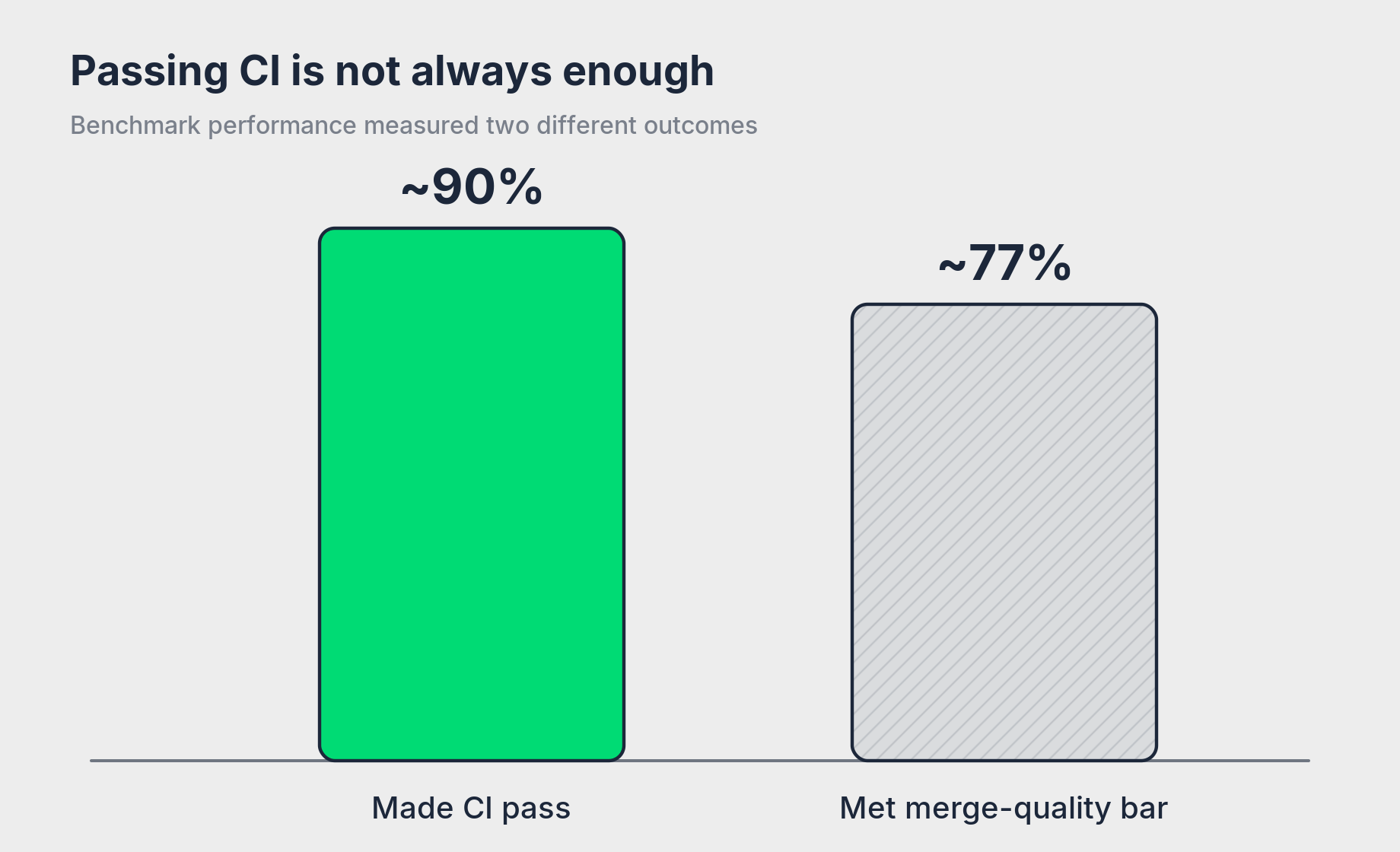
The benchmark exposed a meaningful gap: about 90% of fixes made CI pass, but only about 77% met our merge-quality bar. A green build alone was not always a sufficient measure of success.
The same evaluation problem applies to other agent systems. Intermediate metrics are useful, but the final evaluation needs to represent the outcome the user would accept.
4. Test the same task more than once
Changing the evaluation criteria also exposed variation between repeated runs.
The agent usually diagnosed the problem correctly, but the same failure did not always produce the same quality of fix. Incomplete changes and fixes that expanded beyond the required scope accounted for much of the variation.
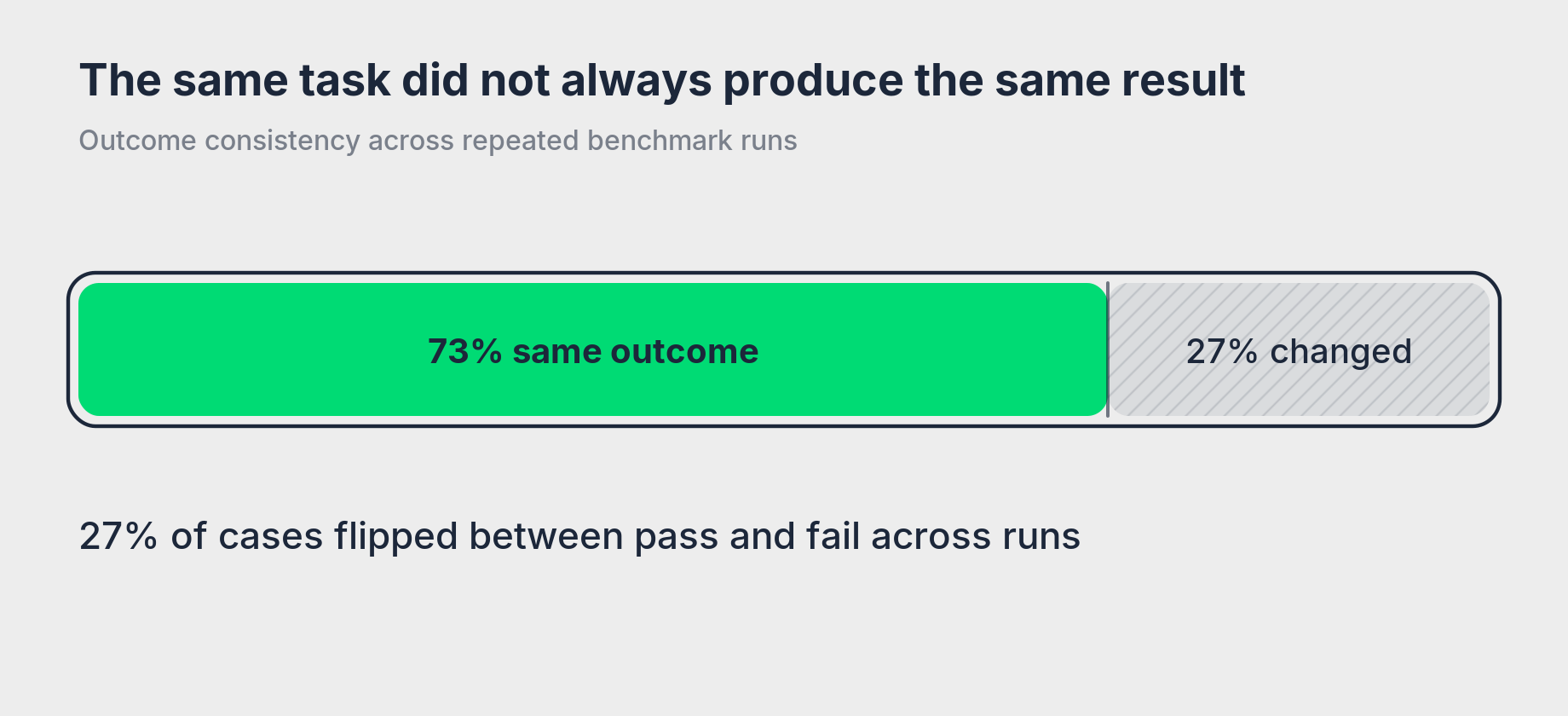
Across repeated benchmark runs, 27% of cases flipped between pass and fail.
Clearer task boundaries helped reduce some of the variation. When the requested scope was narrow and explicit, the agent had less room to make unrelated changes or expand the solution beyond the failure.
For teams evaluating agent workflows, repeat the same tasks and look at the distribution of outcomes. A strong average can hide variation that matters when the system is used repeatedly.
5. Give agents direct access to product data
Cleaner inputs helped once the agent had the information it needed. We also found that agents spent a significant part of each run obtaining and moving information before they could work on the fix.
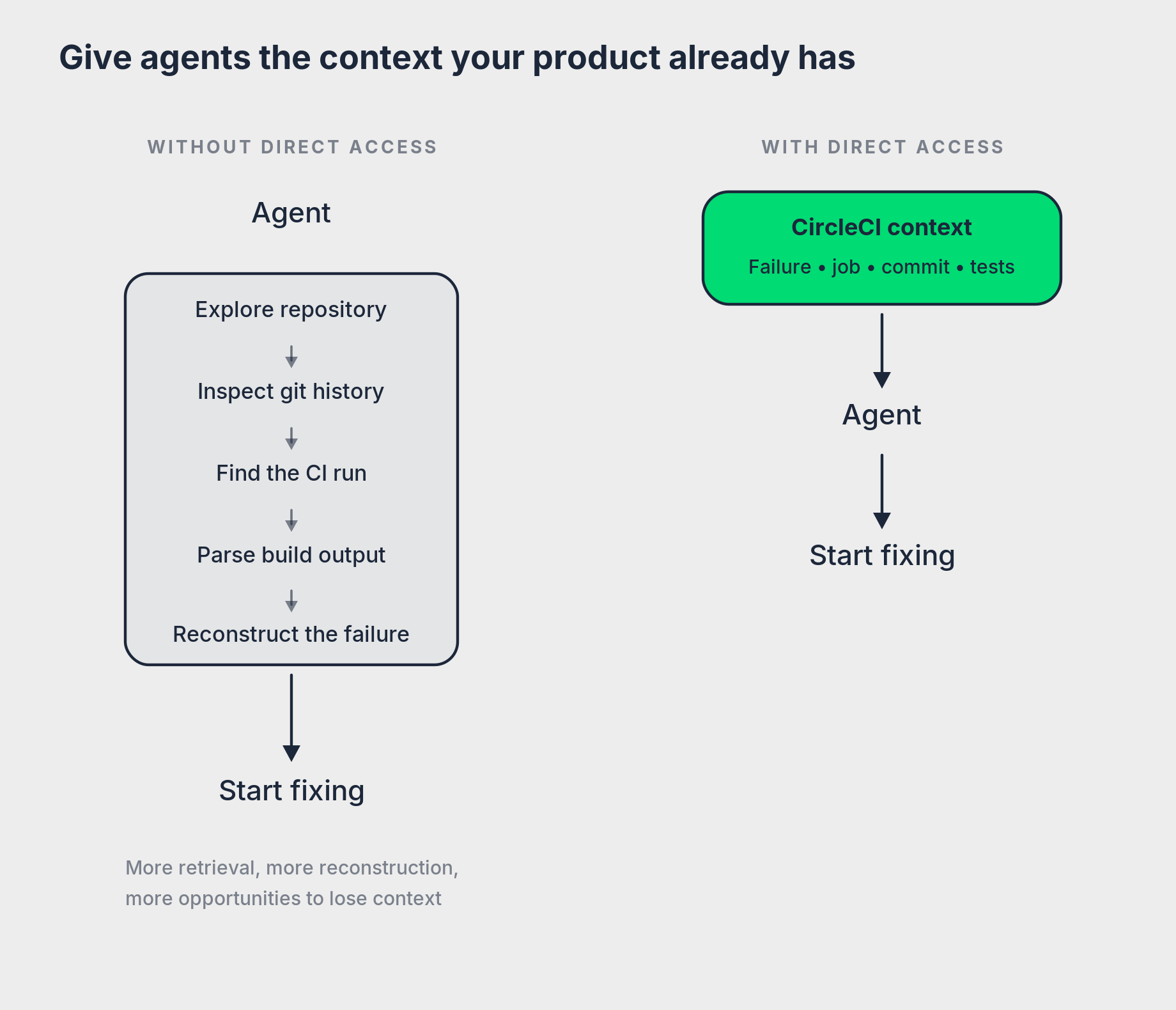
CircleCI already has much of what an agent needs to begin: which workflow failed, which job produced the error, which commit was running, what tests failed, and what happened during execution.
In our testing, only 20–30% of a run was spent reading the error and editing code. The rest included surrounding work such as exploring the repository, working with git, and moving information between systems.
Longer feedback loops also added measurable cost. In one iterative experiment, runtime increased from about 10 to 20 minutes and token usage from 2.4M to 3.6M as the agent kept working toward a passing result.
For teams adding agent access to an existing product, look closely at the information your product already has when an agent begins a task. Direct access can reduce the searching and reconstruction the agent would otherwise need to perform itself.
How we’re improving agent experience at CircleCI
Across the experiments, we eventually reached a point where a capable model could turn CI green on roughly nine in ten benchmark cases: 90% in one run and 84% in the repeat.
Reaching that level required substantial experimentation with context, tools, evaluation, and feedback loops. About 77% of benchmark fixes met our merge-quality bar, but production usage showed that developers wanted to stay closer to the fixing process, and the share of fixes they actually merged remained much lower than we wanted.
Those findings shaped the AX work we’re shipping now. We’re taking what made the fixer effective and building it into interfaces that give developers’ chosen agents first-class access to CircleCI data and actions.
A lot of the infrastructure behind the new experience is new or substantially rewritten, and we’re rolling out improvements on a daily cadence.
Recent changes include:
A ground-up rewrite of the CircleCI CLI for developers and agents, with predictable JSON, stable exit behavior, agent-readable errors, and a built-in MCP server.
circleci run get --failure-report, which gives agents condensed failure diagnostics instead of requiring them to work through complete build logs.
Copy Fix Prompt, which packages the relevant CircleCI failure context into a prompt developers can paste into the coding agent they already use.
Expanded MCP tools for inspecting runs, jobs, build output, and test results and taking CI actions from an agent’s development environment.
OAuth 2.0 with Dynamic Client Registration and PKCE, giving local tools and agent integrations a standard way to request CircleCI API access without a manually provisioned client secret.
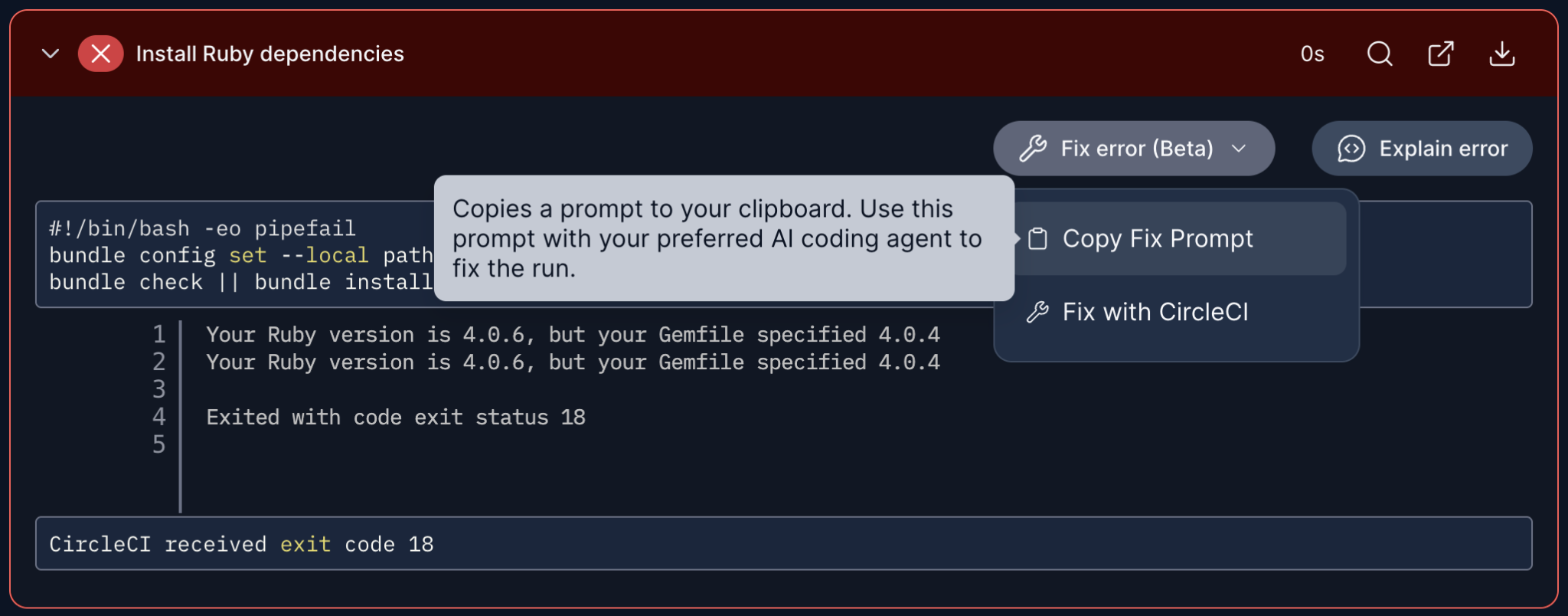
The new Copy Fix Prompt option is one of the ways we’re making CircleCI more friendly to agentic workflows.
The details are still moving as we put these interfaces in front of more real agent workflows. Our goal is to improve both sides of the experience: help agents diagnose and fix CI problems well, while giving developers the visibility and control they need to work with those fixes.
You can try the current fixing flow from any failing CircleCI workflow:
Install the new CircleCI CLI:
brew install circleciRun
circleci run get --failure-reporton a failing run to get condensed diagnostics for your local agentOr use Copy Fix Prompt from a failing workflow for a manual handoff
Need to sign up? Run
circleci onboardfrom the CLI to get started, or create a free CircleCI account from our signup page.
The biggest lesson from our testing is that agent experience is shaped by far more than the model. Context, tool design, evaluation, repeatability, and direct access to product data all changed how reliably agents could work with CircleCI. For teams building for agents, AX means designing those surrounding systems as deliberately as you design the product experience for people.